How to get your customs data from GOV.UK
A step-by-step guide to downloading your HMRC customs declaration data and getting the most from it with CAT360.
- EORI number
- Government Gateway account
- CDS subscription
- Request a report
- Ready, typically within 72 hours
- Download the CSV
- Upload to CAT360
Just looking to sign in? This is a guide to requesting your declaration data. It is not the sign-in page. HMRC has those here:
What is HMRC's Get customs data service?
Get customs data for import and export declarations is HMRC's free service for retrieving your own Customs Declaration Service (CDS) data. It replaced the paid MSS reports, so if you used to buy MSS, or you have heard the data called TRE, this is where it comes from now.
You request a report, HMRC emails you when it is ready, and you download it as a CSV. Four report types are available, covering up to four years of your own declarations. What you do with them is the point: the same data that satisfies an audit also shows where duty was overpaid.
Rather not do this yourself? You can authorise us to pull the reports for you, so they arrive without anyone downloading a CSV.
How to grant accessWhat you need before you start
EORI number (GB or XI)
Your Economic Operator Registration and Identification number, beginning GB or XI. Apply for an EORI if you don't have one.
Government Gateway Account
An individual or organisational user ID (not agent credentials). Create an account if needed.
CDS Subscription
An active Customs Declaration Service subscription linked to your Government Gateway account.
CDS Registration (if needed)
If you haven't already subscribed to the Customs Declaration Service, registration takes approximately 7–8 minutes. You'll need:
- Business address
- Email contact
- Unique Taxpayer Reference or National Insurance number
- VAT registration details
- SIC code (for companies, partnerships, sole traders, charities, public bodies)
Note: The system will automatically create your EORI number if you don't already have one. You cannot register multiple EORI numbers using identical Government Gateway credentials.
How to access your customs data
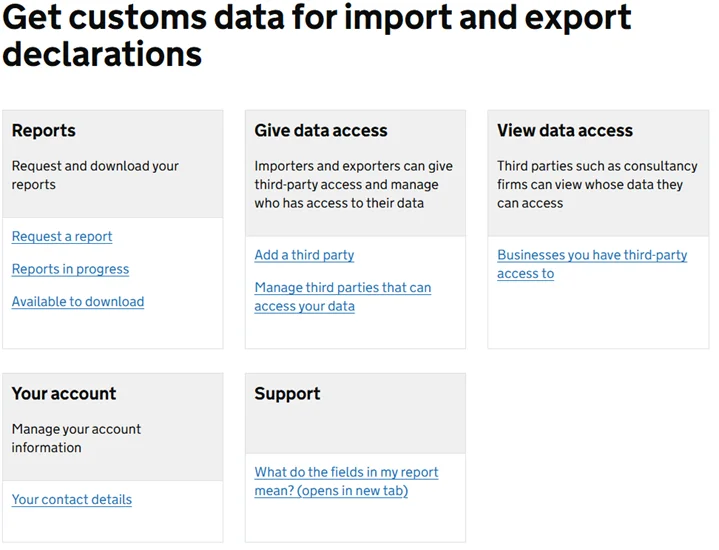
Go to GOV.UK
Open GOV.UK’s Get customs data for import and export declarations service and select ‘Start now’. This is the service that replaced the paid MSS reports.
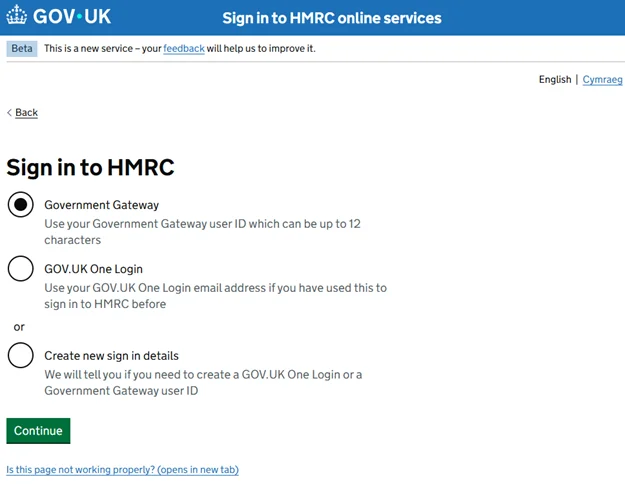
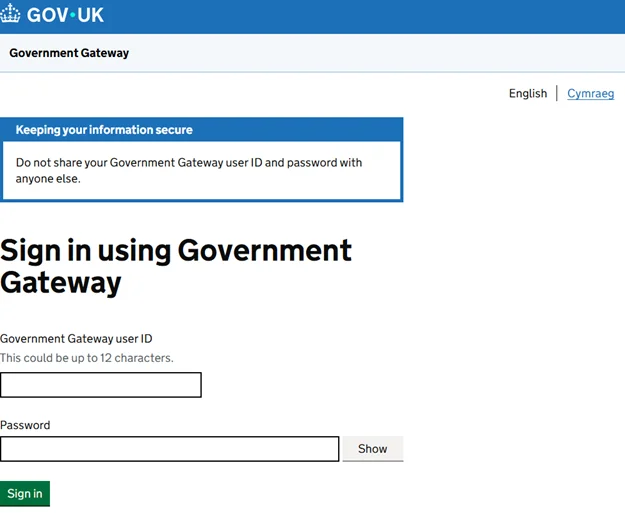
Sign in
Sign in with your Government Gateway credentials. Select ‘Government Gateway’ and enter your user ID and password.
Select your report type
Choose from four available report types (see table below).
Set your date range
Specify up to 31 consecutive days within the past 4 years (excluding the last 2 days).
Confirm and submit
Review your request details and confirm.
Wait for your report
Reports are typically generated within 72 hours.
Download
Download the CSV reports from the service once the notification email arrives. Save a copy: GOV.UK does not say how long a finished report stays available.
Best practice: Request data aligned with calendar months so every day is covered and it's easier to track your data requests.
Available report types
| Report Type | Description |
|---|---|
| Import Item Report | Item-level details including commodity codes, values, and quantities. |
| Import Header Report | Declaration summaries with reference numbers and dates. |
| Import Tax Lines Report | Duty and tax information for financial reconciliation. |
| Export Item Report | Export declaration data with destinations and goods descriptions. |
Filing on behalf of clients? These four reports cover declarations made in your own name. If you are a broker, forwarder or fast parcel operator, the report you want is your declarant data: every declaration you have filed across all your clients in one export. Because it is your own filing data you do not need each client's permission to pull it. See CAT360 for brokers, or book a free review of it.
See what these reports look like inside CAT360: explore dashboards, anomaly detection, and preference analysis with sample data.
Try the interactive demoGrant third-party access to Barbourne Brook
Instead of downloading and uploading reports manually, you can grant Barbourne Brook direct access to retrieve your customs data on your behalf. This enables:
- Automatic data retrieval, no manual downloads
- Direct upload into CAT360 for continuous analysis
- Always up-to-date dashboards and insights
How to grant access
Sign in
Sign into GOV.UK's Get customs data for import and export declarations service.
Navigate to ‘Give Data Access’
Click ‘Add a third party’ to begin sharing your data.
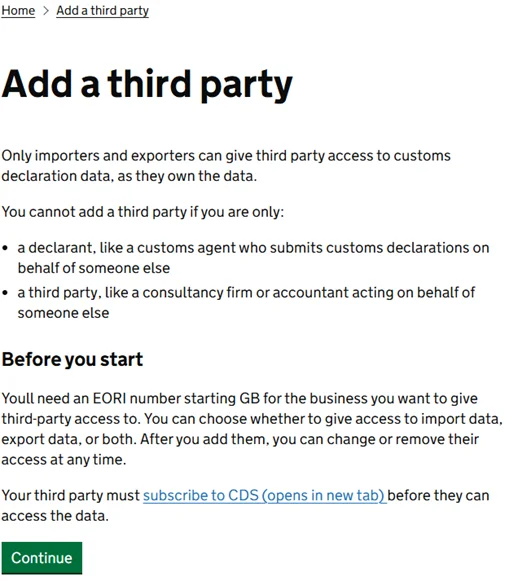
Confirm data ownership
Select ‘Yes, I own the customs declaration data’ and click Continue.
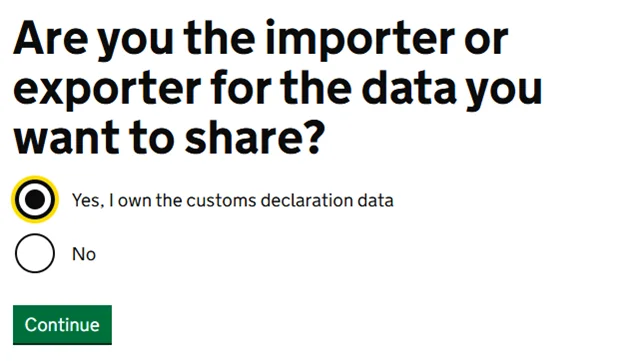
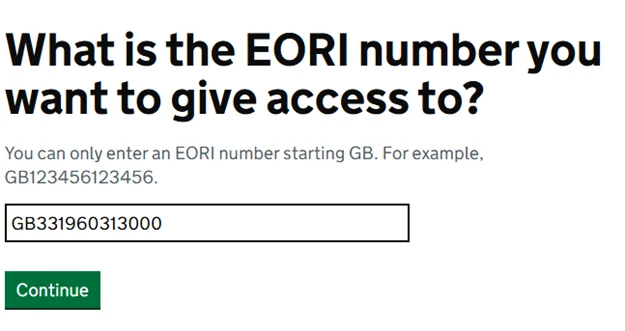
Enter Barbourne Brook's EORI
Use our EORI number: GB331960313000
Set reference name
Enter Barbourne Brook as the reference name.
Set access period
We recommend selecting ongoing access so there's no renewal required.
Select data types
Choose Import and Export with all data types selected.
Review and confirm
Check the details and confirm. You can remove access at any time through the same portal.
Important: Access is limited to data retrieval only. No modifications to your account are possible. You can remove access at any time. For help, contact enquiries@barbournebrook.co.uk or call +44 (0)1905 975 399.
Frequently asked questions
Common questions about accessing your HMRC customs data.
Visit the GOV.UK registration page. You'll need basic personal or business information to create an account.
Check your spam folder, then sign in to verify download availability. If the issue remains unresolved, contact HMRC directly.
If the EORIs are your own, yes: you sign in separately with the Government Gateway user ID linked to each one. A third party granted access is different, and can request data for several EORI numbers under a single user ID.
GOV.UK does not publish a limit. Each report covers up to 31 consecutive days, so a year of data means twelve requests aligned to calendar months.
All reports are provided as CSV files, compatible with Excel, Google Sheets, and analytics tools like CAT360.
Yes. The service is free, and it now covers XI EORI numbers as well as GB. It replaced the MSS reports, which HMRC charged for.
Ready to see what is in your own declarations?
Start your free 14-day trial of CAT360 today and see how AI², the fusion of automation and expert insight, can uncover savings, reduce risk, and give you full control of your customs operations. No card required, just instant intelligence.
Start free trial





Importers and brokers using CAT360